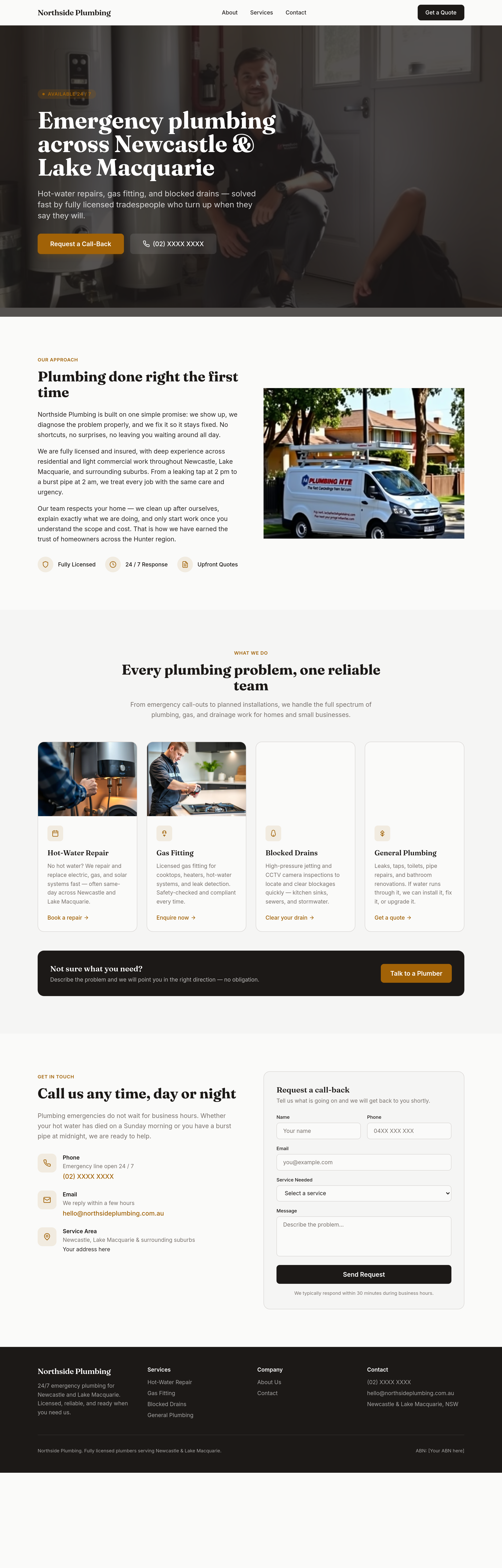
the colours are flat — use bold orange + dark navy for tradie confidence
What changed: hero


View full page before/after

Agent's response
I’ve updated the colour scheme across the entire homepage to give it a bold, tradie‑confident look:
* **Primary colour** (used for backgrounds, headings, body text, form fields, etc.) is now a dark navy #001F3F.
* **Accent colour** (used for badges, buttons, links, icons, hover states, focus rings, etc.) is now a vivid orange #FF6F00.
The changes were applied to the header, hero, about, services, contact, and footer sections using scoped CSS so the existing layout and structure remain intact.
Drafts are ready for your review—just publish when you’re happy with the new look.
Tool calls
list_sections step 1
{
  "page": "index.html"
}
read_section step 2
{
  "page": "index.html",
  "section": "hero"
}
set_section_styles step 3
{
  "page": "index.html",
  "section": "hero",
  "css": ".bg-accent { background-color: #FF6F00; }\n.bg-accent:hover { background-color: #e65c00; }\n.text-accent { color: #FF6F00; }\n.bg-primary { background-color: #001F3F; }"
}
read_section step 4
{
  "page": "index.html",
  "section": "header"
}
set_section_styles step 5
{
  "page": "index.html",
  "section": "header",
  "css": ".text-primary { color: #001F3F; }\n.hover:text-accent { color: #FF6F00; }\n.bg-primary { background-color: #001F3F; }\n.hover:bg-ink { background-color: #FF6F00; }"
}
read_section step 6
{
  "page": "index.html",
  "section": "about"
}
set_section_styles step 7
{
  "page": "index.html",
  "section": "about",
  "css": ".text-accent { color: #FF6F00; }\n.text-primary { color: #001F3F; }\n.bg-accent { background-color: #FF6F00; }"
}
read_section step 8
{
  "page": "index.html",
  "section": "services"
}
set_section_styles step 9
{
  "page": "index.html",
  "section": "services",
  "css": ".text-accent { color: #FF6F00; }\n.text-primary { color: #001F3F; }\n.bg-accent { background-color: #FF6F00; }\n.bg-accent:hover { background-color: #e65c00; }\n.bg-primary { background-color: #001F3F; }"
}
read_section step 10
{
  "page": "index.html",
  "section": "contact"
}
set_section_styles step 11
{
  "page": "index.html",
  "section": "contact",
  "css": ".text-accent { color: #FF6F00; }\n.text-primary { color: #001F3F; }\n.bg-accent { background-color: #FF6F00; }\n.bg-primary { background-color: #001F3F; }\n.bg-primary:hover { background-color: #e65c00; } /* maybe hover orange? but we want hover bg-ink originally; we can keep as is but we can set hover:bg-ink to orange? We'll just set .bg-primary:hover { background-color: #001F3F; }? Actually we want button hover maybe orange? We'll keep default but we can set .bg-primary:hover { background-color: #001F3F; } no change. We'll just set
set_section_styles step 12
{
  "page": "index.html",
  "section": "contact",
  "css": ".text-accent { color: #FF6F00; }\n.text-primary { color: #001F3F; }\n.bg-accent { background-color: #FF6F00; }\n.bg-primary { background-color: #001F3F; }\n.bg-primary:hover { background-color: #e65c00; }\n.focus:ring-accent { box-shadow: 0 0 0 3px rgba(255,111,0,0.2); }\n.border-accent { border-color: #FF6F00; }"
}
read_section step 13
{
  "page": "index.html",
  "section": "footer"
}
set_section_styles step 14
{
  "page": "index.html",
  "section": "footer",
  "css": ".bg-primary { background-color: #001F3F; }\n.hover:text-white { color: #FF6F00; }"
}